Build a 12-month opening budget
Test a delayed opening, slower bookings, owner pay and a new equipment payment.
Med spa resources in one place: cost calculators, buying comparisons and practical worksheets for opening, running and growing an aesthetic practice. Start with the decision you are making.
Read the guide for context, then adjust the figures. The examples are fictional; saving your own work asks for contact details and separate storage consent.
Test a delayed opening, slower bookings, owner pay and a new equipment payment.
Match the purchase or financing terms, supplies and service costs over the same period.
Include subscriptions, payment processing, add-ons and switching costs.
Work through booked visits, cancellations, provider time, room time and device time.
See what supplies, marketing and slower bookings mean for monthly contribution.
Use your own treatment price, costs and volume to explore a device’s economics.
Search by question, filter by topic or choose resources with interactive tools. Guides remain available without registering.
12 resources
Clear filtersCompare aesthetic training courses by format, supervised practice, access and full cost, using a worked example before treating a certificate as the answer.
Read the guideMed spa software comparison by workflow and total cost: booking, records, payments, packages and switching costs, plus how to run a useful demo.
Read the guideCompare aesthetic equipment quotes on the same basis: handpieces, supplies, service, training and financing, using a worked two-offer cost model.
Read the guideMed spa startup costs and a 12-month cash-flow example: opening payments, staffing, slower bookings and a delayed opening, with assumptions you can edit.
Read the guideBefore buying software, map your med spa workflow from booking to follow-up and find the handoffs that break, so demos test what actually matters.
Read the guideDevice ROI calculator for aesthetic practices: model financing, treatment economics, capacity and a slower ramp-up to see what an investment must earn.
Open the toolChoose your practice stage and priority, see a starting point, then save suggested actions, resources and notes.
Open the tool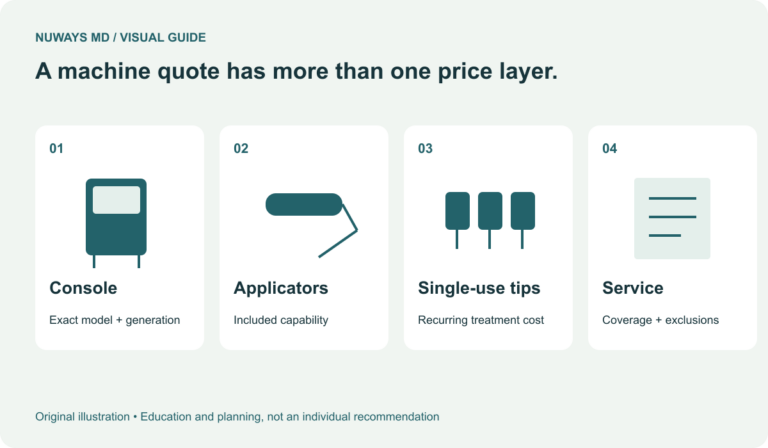
RF microneedling machines compared for practice owners: Morpheus8, Genius, Potenza and more, with team readiness, recurring costs and support.
Read the guideBody-contouring equipment buying guide: compare treatment goals and platforms, then model supplies, marketing, packages and slower bookings.
Read the guideGet equipment buying help from NuWays MD: describe the machine you are considering or a quote to review, and get a personal reply on costs and next steps.
Open the tool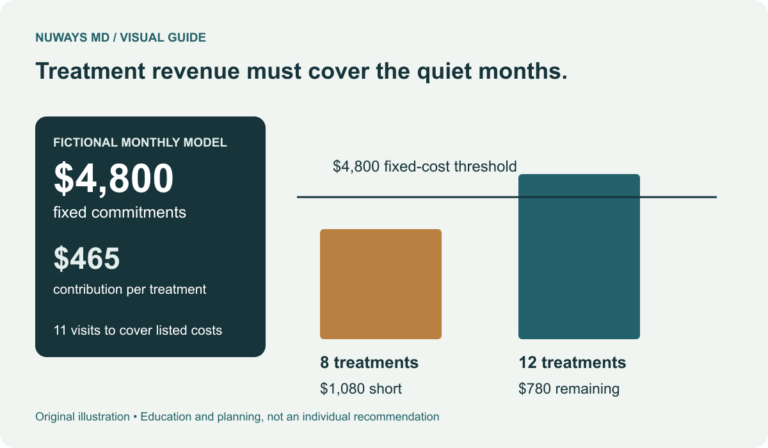
Aesthetic equipment ownership costs beyond the price: payments, supplies, service and demand, with a worked example and a slower-start scenario.
Read the guideMed spa capacity planning with a worked schedule: compare provider, room and device capacity, model cancellations and test hiring or expansion.
Read the guideEditable plain-text prompts you can open, copy or print. No registration needed.
Prepare the configuration, service and supply questions for a vendor.
List costs, dependencies and decisions before opening.
Take the same workflow and migration questions into each demo.
Compare objectives, supervised practice, prerequisites and support.
Define each measure, its source and the action it will inform.
Try the examples first. Save your own work when you want to return to it.
Keep an opening budget, equipment comparisons, software costs or a capacity worksheet with the questions you still need to resolve. Update the figures as your plans change.
Read the reasoning and inspect the calculation.
Enter your figures, mark open questions and save the worksheet.
Return through your private practice workspace and update your next action.
Saving is free and asks for your name, work email and permission to store your plan. It does not sign you up for marketing or authorize a vendor introduction. Keep your private return key to reopen your plan in another browser.